

Human-in-the-Loop Workflows
Build workflows that pause for human decisions and resume when ready
Some workflows need humans to make decisions.
Maybe it's approving a high-value order. Or reviewing content before publishing. Or signing off on a production deployment. These workflows need to pause, wait for a human decision, and continue when the decision arrives.
Motia handles this naturally. You save your progress, stop emitting events, and create an API webhook for the human to call. When they make their decision, the webhook picks up right where you left off.
How It Works
Human-in-the-Loop workflows in Motia work like this:
- Process automatically when possible - Let the system handle what it can
- Save "awaiting" state when human needed - Mark the pause point clearly
- Stop enqueuing - The workflow naturally pauses
- Webhook resumes the flow - External systems call an API to continue
No special "pause" or "wait" commands. Just save state and use HTTP trigger steps as re-entry points.
Key Ideas
| Concept | What It Means |
|---|---|
| Workflows don't sleep | They don't "wait." They save state and stop processing. |
| HTTP steps are re-entry points | External systems call webhooks to restart the flow |
| State checkpointing | Every state.set() is a save point you can resume from |
| Virtual connections | Use virtualSubscribes and virtualEnqueues to show how webhooks fit in the flow visually |
The workflow doesn't have a concept of time. It only knows: "Is the right state present? Has the right step been triggered?"
Real Example: Order Approval
Let's build an order processing system that auto-approves low-risk orders but pauses for human review on high-risk ones.
Example Location: examples/foundational/workflow-patterns/human-in-the-loop/
The Flow
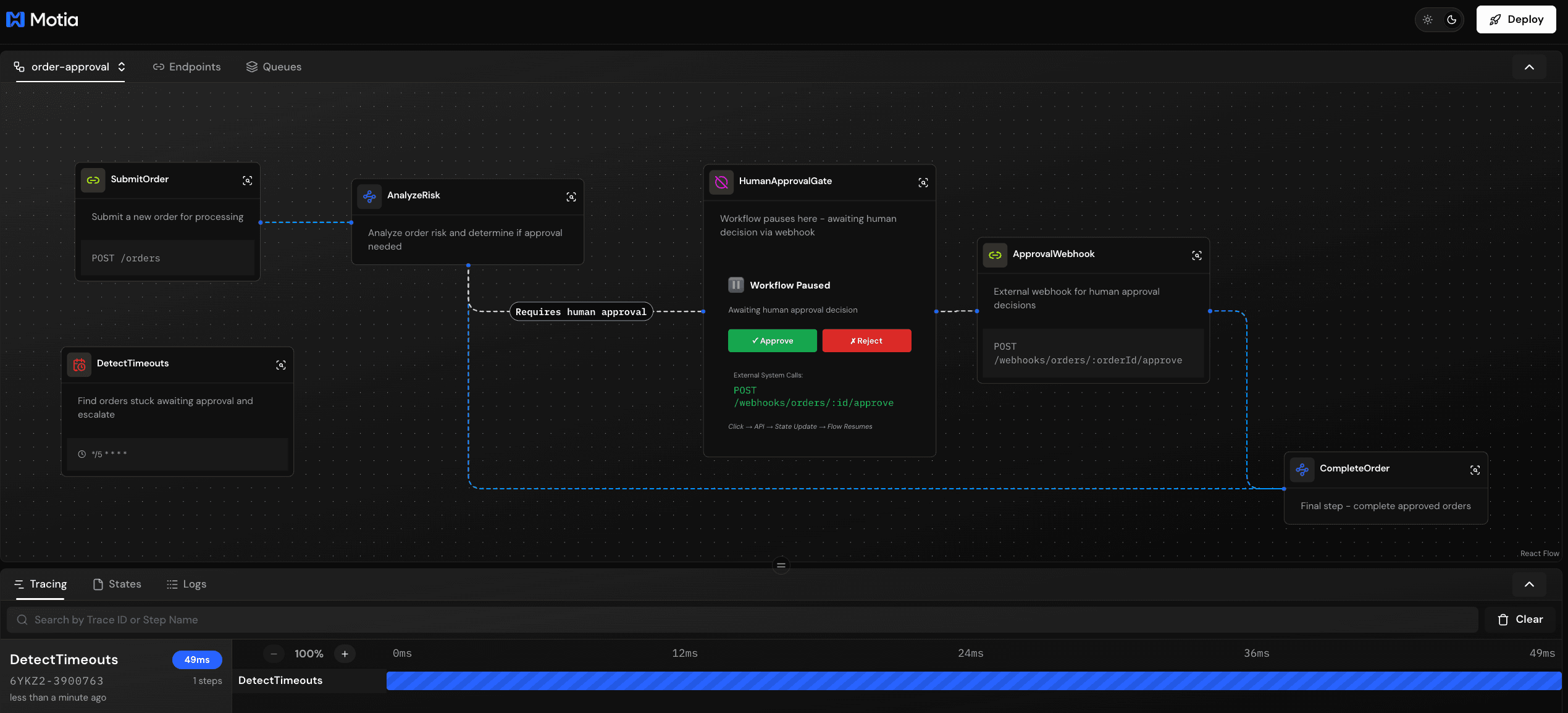
Step 1: Submit Order
An API receives the order and saves it immediately:
👉 Key point: We save the order immediately with currentStep and completedSteps. This becomes our checkpoint system.
Step 2: Analyze Risk
This step decides whether to auto-approve or pause for human review:
👉 The key decision:
- High risk: Save "awaiting" state and don't enqueue → workflow stops
- Low risk: Emit immediately → workflow continues
Step 3: Human Approval Gate (Visual Noop)
This creates a visual node in the iii development console showing where the workflow pauses:
👉 In the iii development console: This Noop appears between AnalyzeRisk and ApprovalWebhook.
Step 4: Approval Webhook (Re-Entry Point)
External systems (UI, Slack, etc.) call this webhook to provide the human decision:
👉 The pattern: Load checkpoint → Verify state → Apply decision → Resume or end
Step 5: Complete Order
Final step that runs after approval:
Recovery Pattern: Timeout Detection
What happens if a human never responds? In production, you need a safety mechanism to detect and escalate stuck workflows.
Step 6: Timeout Detection (Cron)
A scheduled job periodically scans for orders stuck in approval:
👉 Why this matters: Without timeout detection, orders could be stuck forever. This cron job acts as a safety net, ensuring no workflow is forgotten.
Production actions:
- 📧 Send escalation emails/Slack messages
- 🔄 Reassign to different approvers
- ⏰ Auto-reject after threshold
- 🎫 Create support tickets for investigation
🎨 Visual Flow in the iii Development Console
When you open the example in the iii development console, you'll see 5 nodes:
- SubmitOrder (green) - API entry point
- AnalyzeRisk (blue) - Risk calculation and decision point
- HumanApprovalGate (gray Noop) - ⏸️ Pause indicator showing where workflow stops
- ApprovalWebhook (green) - Re-entry point for human decisions
- CompleteOrder (blue) - Final fulfillment step
The virtual connections (dashed lines) show:
approval.required→ HumanApprovalGatehuman.decision→ ApprovalWebhook
This visualizes exactly where external systems restart the flow. Low-risk orders bypass the gate entirely - they flow directly from AnalyzeRisk to CompleteOrder.
Trying It Out
Ready to see it in action? Let's get the project running.
Try it yourself:
Install Dependencies
First, install the necessary npm packages.
Run the Project
Start the Motia development server.
Open http://localhost:3000 in your browser to access the iii development console. You'll see the HumanApprovalGate (Noop node) showing where the workflow pauses for human decisions.
Test High-Risk Order (Will Pause)
Submit an order with high value to trigger the approval gate:
Response:
Check the iii development console: The flow stops at HumanApprovalGate. No more steps run. The workflow is paused and waiting for human decision.
Resume via Webhook (Hours/Days Later)
When you're ready (could be minutes, hours, or even days later), approve the order:
Check the iii development console: Flow resumes! It loads state, enqueues order.approved, and CompleteOrder runs to fulfill the order.
Test Low-Risk Order (Bypasses Gate)
Submit a low-value order that auto-approves:
Check the iii development console: Flows straight through SubmitOrder → AnalyzeRisk → CompleteOrder. The HumanApprovalGate is completely bypassed!
State Management
Your state tracks the workflow position:
When the webhook is called, it:
- Loads this state
- Verifies
currentStep === 'awaiting_approval' - Updates with approval info
- Enqueues to continue
💻 Dive into the Code
Want to explore the complete implementation? Check out the full source code and additional examples in our GitHub repository:
Explore More Examples
Get hands-on with the complete source code, configuration files, and additional examples to accelerate your learning.
Summary
Building Human-in-the-Loop workflows in Motia:
- Save state when pausing - Mark clearly with
status: 'awaiting_something' - Don't enqueue - Workflow stops naturally
- Create webhook API - This is your re-entry point
- Use virtual connections - Show the pause visually in the iii development console with Noops
- External systems call webhook - UI, Slack, etc. restart the flow
- Idempotent steps - Always check
completedStepsbefore doing work
Your workflow can pause for minutes, hours, or days. When the webhook is called, it loads state and continues exactly where it left off.
Use Cases
This pattern works for:
- Order approvals - High-value or risky purchases
- Content moderation - Review before publishing
- Document signing - Wait for signatures
- Deployment approvals - Manager sign-off for production
- Support escalations - Human agent intervention
- Compliance review - Legal approval required